
Search the knowledge base, browse our resources, and visit our Community Forum for more detailed information
Last updated: 23 Jul 2026
Your KoboToolbox account settings allow you to manage your profile information, access security features, and monitor usage. You can also upgrade your plan or purchase add-ons for additional storage and automatic transcription or translations.
To access your account settings:
Sign in to your KoboToolbox account.
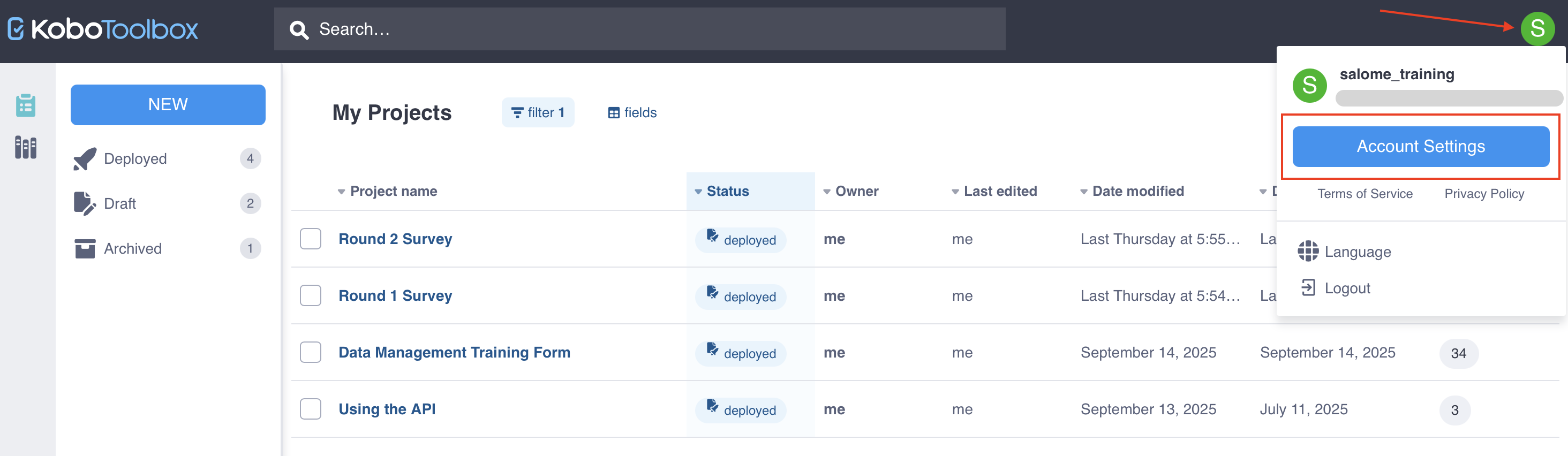
Click your profile icon in the top right corner.
Click on Account Settings.
The Profile page is the default view when you open your account settings.
In the Profile page, you can edit the following information:
Full name
Country and city
Sector and organization type
Organization name and website
Short bio and LinkedIn profile
You can also sign up for the KoboToolbox newsletter to receive occasional updates about KoboToolbox.
You can also delete your KoboToolbox account from the Profile page. To delete your account:
Delete or transfer ownership of all projects owned by your account.
In Account Settings > Profile, click Delete account. This button will be disabled if you have not deleted all projects owned by your account.
Type in your username to confirm your account deletion. This action cannot be undone once completed.
Note: You do not need to delete projects shared with you by other users before deleting your account.
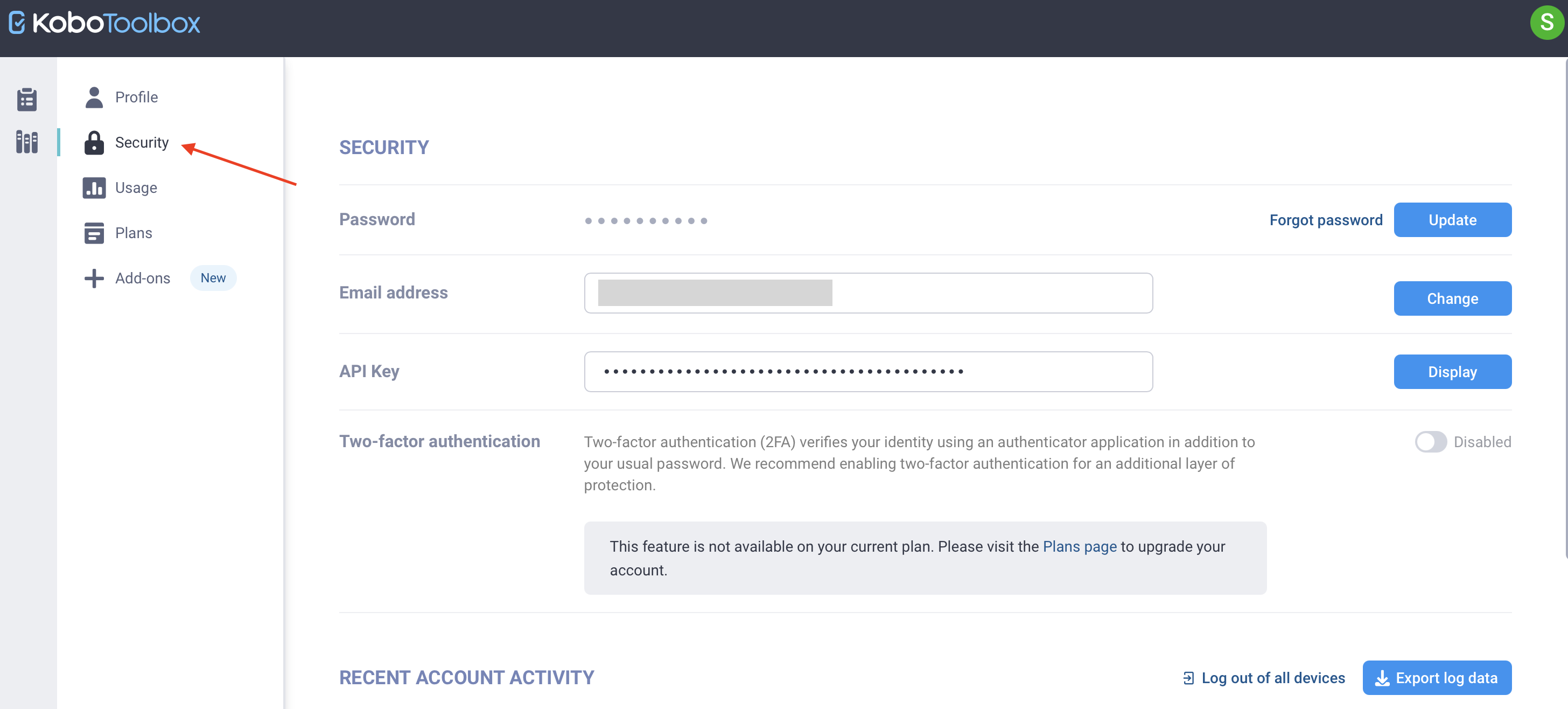
To access your security features, select the Security page in the account settings menu.
On the Security page, you can:
Change your password.
If you know your current password, click Update.
If you have forgotten your current password, click Forgot password to reset it.
Update your email address by clicking Change next to Email address.
Display or regenerate your API Key, which is required for certain types of authentication with the KoboToolbox API.
Enable two-factor authentication (2FA) to protect your account.
View recent account activity and export log data.
Log out of all devices connected to your account.
To monitor your account usage, select the Usage page in the account settings menu. Monitoring account usage can help ensure compliance with your plan’s limits.
The Usage page has two tabs:
The Account Total tab displays your plan limits and total account usage.
The Per Project Total tab displays usage for each of your projects.
You can monitor the following usage types:
Usage type |
Description |
|---|---|
Submissions |
The total number of survey submissions that have been collected by projects owned by your account in the current billing cycle. |
File storage |
The total size of photos, audio, videos, and files collected with your surveys or imported in project Settings > Media. |
Transcription minutes |
The number of transcription minutes that have been used by your account for automatic audio file transcription. |
Translation characters |
The number of translation characters that have been used by your account for automatic translation of audio transcripts. |
To learn more about account limits, upgrading your plan, and managing file storage, see Managing account usage limits.
KoboToolbox offers various plans to suit different data collection needs. To view a summary of different plans and upgrade your current plan, select the Plans page in the account settings menu.
On the Plans page, you can:
View your current plan, including quotas and feature usage.
Upgrade to a Professional or Teams Plan.
Toggle between Monthly and Annual views to see different prices and plan limits based on billing cycle.
To learn more about KoboToolbox plans and limits, see Pricing.
Account add-ons are packages that you can add to your current plan to increase your usage limits. If you are approaching or have reached the usage limits included with your plan, you can purchase add-ons for additional usage.
Note: Add-ons can be added to your plan at any time. To avoid any interruptions in data collection, we recommend that add-ons be purchased before you reach your limit.
To purchase add-ons for your account, select the Add-ons page in the account settings menu.
On the Add-ons page, you can:
Purchase a File Storage add-on to add up to 50GB of file storage to your KoboToolbox account, if you are on the free Community Plan.
Purchase an NLP Package add-on to increase your transcription minutes and translations characters.
Purchase an Automatic analysis requests add-on to increase your AI-generated qualitative analysis quota.
Note: If you need to increase your submission limits, contact our support team to purchase an unlimited submissions add-on.
To change the language of your KoboToolbox interface:
Go to the Projects home page.
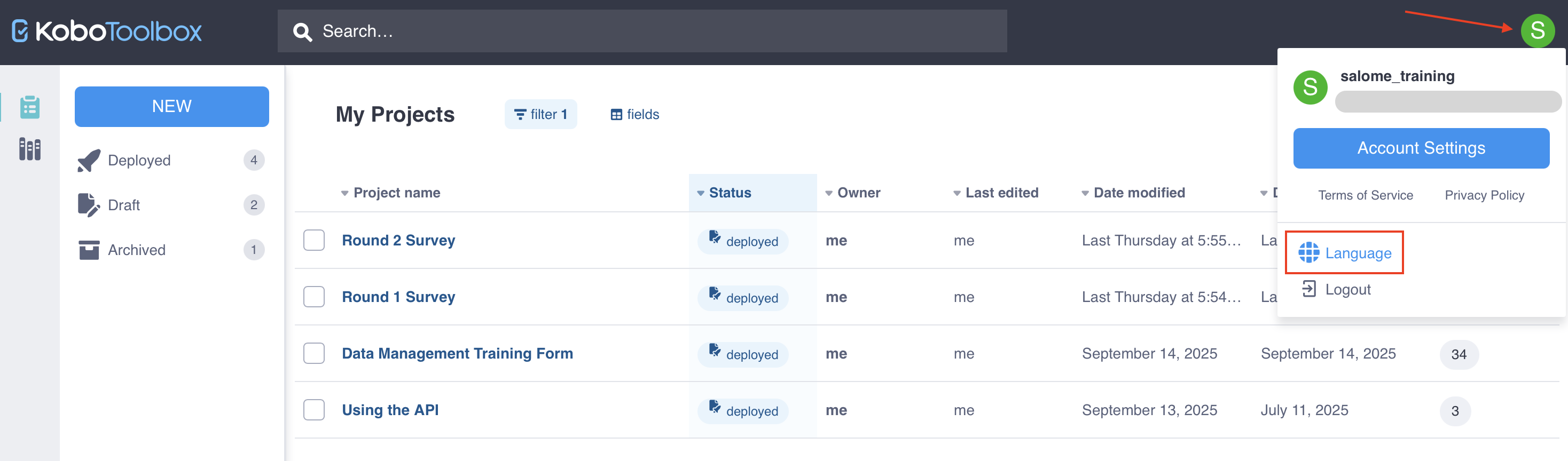
Click your profile icon in the top right corner.
Click on Language and select your preferred language.
Did you find what you were looking for? Was the information clear? Was anything missing?
Share your feedback to help us improve this article!